Drag to move.
Release to camouflage.
Open the homepage and use the game’s own “Tap to play” prompt. Press and drag on the playing field to steer. Release the mouse or lift your finger to stop and let camouflage build. Holding your finger down is not the same as releasing, even if your character has reached the point you chose.
| Action | Desktop | Touch |
|---|---|---|
| Move | Press and drag | Drag with one finger |
| Blend | Release the mouse | Lift your finger |
| Sound | Use Mute inside the game. Our theme control does not change audio. | |
| Pause | Use Pause inside the game; read the current Resume issue first. | |
| Larger view | Choose Expand above the game, then the visible Close button to return. | |
Standing still lets the game continue while Camo builds. It does not pause the Seekers or the countdown.
Read the field before crossing it.
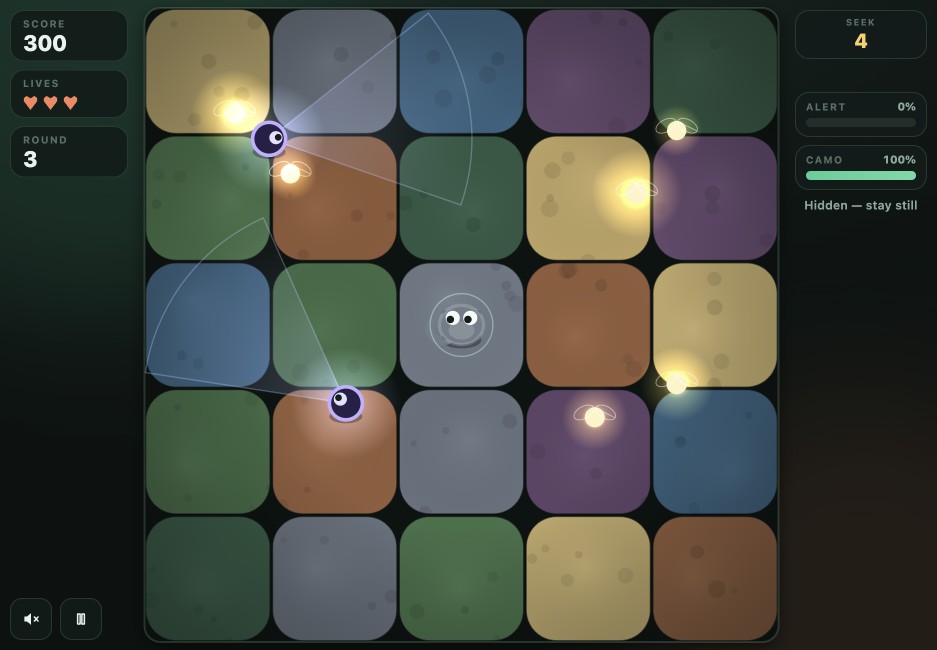
- Score
- Your running points. Fireflies add points, and surviving a round also gives a bonus. You do not have to collect every firefly to advance.
- Hearts / lives
- The hearts show remaining chances. Filling Alert costs a life; losing all lives ends the run.
- Round
- The current stage of the run. Later rounds change the pressure from the Seekers. In this capture we were in Round 3.
- Hide / Seek timer
- The phase label and its countdown. Hide is the setup period; during Seek, the moving lights search the field. Survive the Seek countdown to reach the next round.
Camo and Alert do different jobs.
- CAMO
- Your camouflage charge. It builds after you release and stand still; moving reveals you.
- ALERT
- The danger of being caught. It rises when a Seeker sees you and can fall when you are no longer exposed to it.
Read both meters and the light cones. A partly filled Camo bar is not a promise that a crossing is safe. Sound and pause controls are inside the game; HUD positions can change with the available space.
A short move, then a real stop.
Use this sequence for your first moves. The screenshots were taken later in the same test run, at Round 4 and Score 600, so you can see the change in the Camo reading clearly.
- Observe before dragging. Find your character, a nearby firefly and the direction of the nearest light cone. Let a light pass before choosing a short route.
- Make one short drag, then release. In our first capture, the drag had ended and Camo was already recovering at 73%. The hint still read “Blending… hold still”.
- Wait and read the meters. In the next capture, Camo reached 100% and the hint became “Hidden — stay still”. Alert stayed at 0% in these two moments, while the Seek timer went from 5 to 4.
- Choose the next opening. Do not keep holding the pointer down while waiting. Watch the next sweep and repeat a short move when there is room.
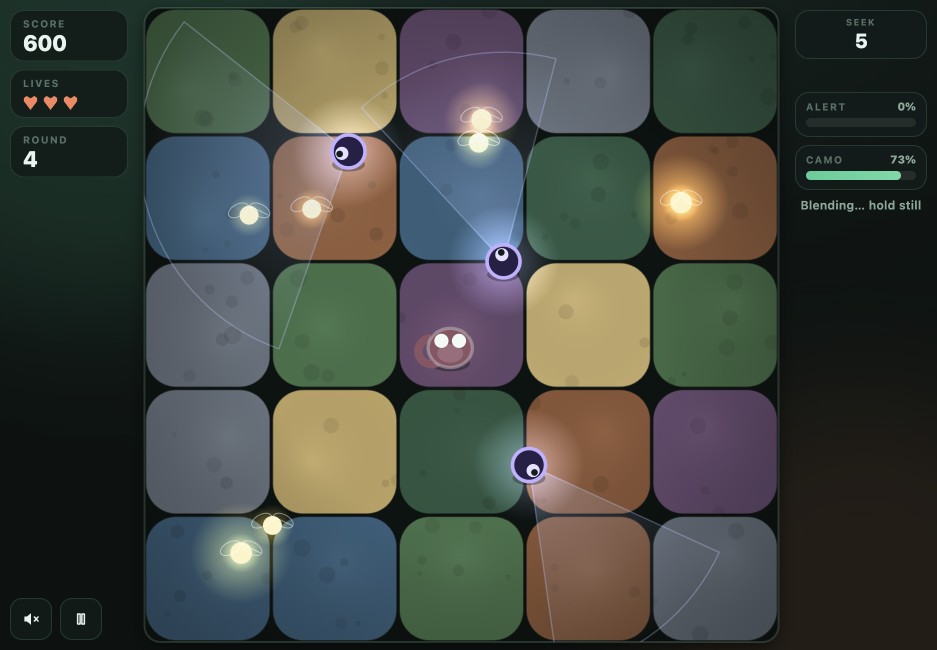
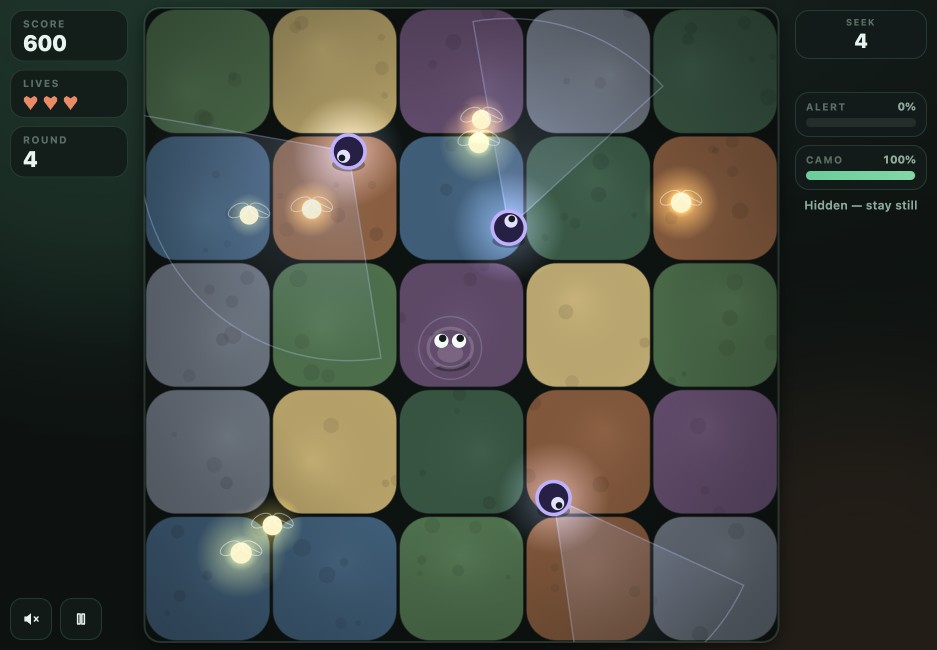
What this example proves: releasing and waiting changed the visible Camo reading in this run. Both captures show Score 600; they do not show a firefly collection. The 73% reading is a snapshot, not a recommended threshold or a guaranteed hiding time.
For a first run, surviving a round is a useful goal before chasing every firefly. This is our play advice, not a guaranteed route or score.
Get back to the playing field.
On a small screen
Use Expand above the frame if you need more room. Drag inside the actual playing field with one finger, then lift to blend. To read this guide or scroll the page, start your swipe outside the game. Use the visible Close button to leave the expanded view.
We checked portrait 390 × 844 and landscape 844 × 390 with Chrome touch emulation. Touch dragging changed Camo and releasing let it recover without scrolling the outer page during the test. We have not checked a physical iPhone, Android phone or mobile Safari.
If you only see the title screen
The website loads the frame automatically, but the game still needs its own “Tap to play” gesture. Tap inside the game, not the website heading. If you want sound, use the game’s Mute control and your device volume settings.
If the frame is blank or keeps loading
- Give the source time to load. The game is served by a separate host. Our “Game frame loaded” message only confirms a frame event; it cannot confirm that the game is playable.
- Try Reload once. Use the circular-arrow button above the game. It reloads the original frame and starts a fresh session, so current run progress is lost.
- Compare with the source. Open Original on 8x.gg ↗. If the original also fails, the problem may be with its host or the connection. If it works there, playing there is a useful fallback while you report the embedded-page issue.
Include your browser, screen orientation and what you can see when reporting a problem. You do not need an APK, a new account on this website or a download from another Mottle domain.
When Resume stays paused.
In our desktop check on November 15, 2026, pressing Pause opened this panel. Clicking Resume left the panel visible and the Seek timer stopped. Repeated Resume clicks did not recover the run in that check.
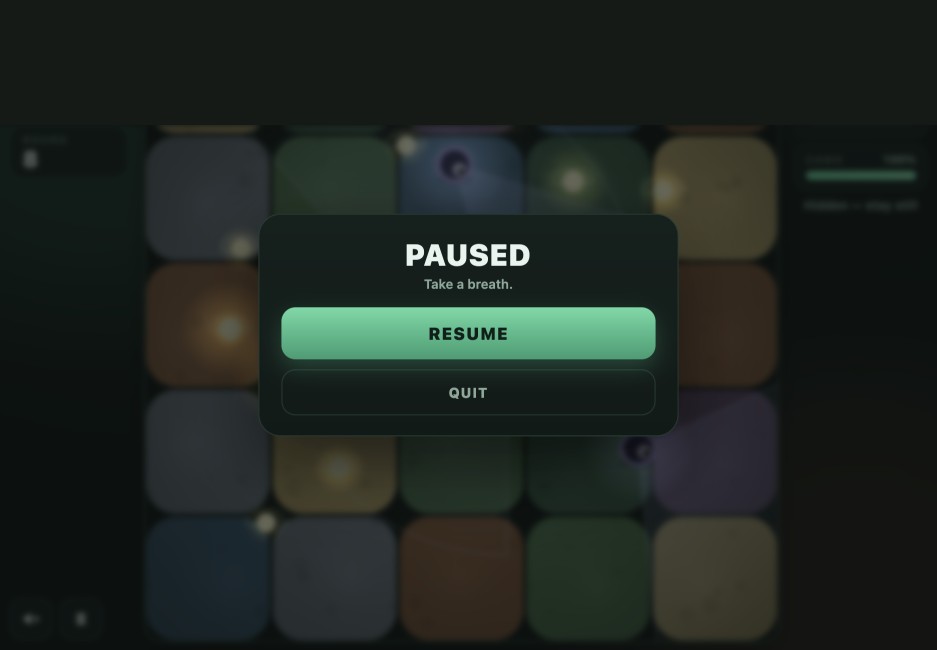
The recovery we verified: use Reload above the game, wait for its title screen, then choose “Tap to play” to start again. This loses the current run. We did not find a way to preserve that run through the stuck pause state.
Expand and Close change our page’s layout; they do not repair a paused game. The game runs on its creator’s host, so we cannot patch Resume from this website. Use the original listing’s feedback route ↗ for game problems. Opening the original is a comparison step, not a confirmed fix for Resume.
Actual captures. A dated check.
All four gameplay images on this page were captured from the original embedded Mottle game on November 15, 2026. They show real game states, with no generated or reconstructed HUD. Game and artwork by Star Lord; screenshots and this independent guide by ismottleagame.org.
- Desktop: started a run, made short drags, released to rebuild Camo, observed rounds and score changes, and checked Mute, Reload and Expand / Close. The paired example records Camo 73% then 100%, with Alert 0% in both frames.
- Touch emulation: tested dragging and release in portrait and landscape Chrome viewports. This covers simulated touch input, not physical phone compatibility.
- Known failure: Resume did not continue the paused run. This corrects our earlier note that said Resume responded; seeing the control respond was not enough to establish that play resumed.
The creator’s 8x.gg listing supplies the game’s identity and authorship. Our controls and interface notes also use the current original runtime and direct play observations. The walkthrough is editorial advice. Later game updates may change these results.